By Lenny Rowell, GMB Marketing Solutions · Last reviewed: November 2026
If you want to rank higher on Google Maps, you need to know how Google actually picks the three businesses at the top of the map, and which popular “tricks” don’t do anything. I’ve spent years inside the Business Profile dashboard for my own business and for clients around Charlotte, and I’ve had a profile suspended, so this is what I’d tell you sitting across the table. Everything below is checked against Google’s own guidelines and the best published tests, and I’ll tell you which is which.
One example: an auto glass shop in Texas reached number one in Maps for its main keywords and now gets hundreds of calls a month. It took a few months, starting with the first fix below.
How Google decides who gets into the 3-pack
Google says local results are based mainly on three things:
- Relevance: how well your profile matches what someone searched.
- Distance: how far you are from the person searching, or from the place they searched for.
- Prominence: how well known and trusted your business is, online and off. Reviews are a big part of it.
Every ranking tip you’ll ever hear fits under one of those three. And notice one thing right away: you can’t control distance. The same search from two ends of town will show different businesses. That’s why nobody can honestly promise you the number one spot everywhere. What you can do is win on relevance and prominence.
How to rank higher on Google Maps: what actually moves you up
1. Get your primary category right
Your primary category tells Google what you are. In Whitespark’s 2026 survey of 47 local SEO experts, the primary category ranked as the number one factor out of 187. That’s expert opinion, not a Google statement, but it matches what I see on real profiles.
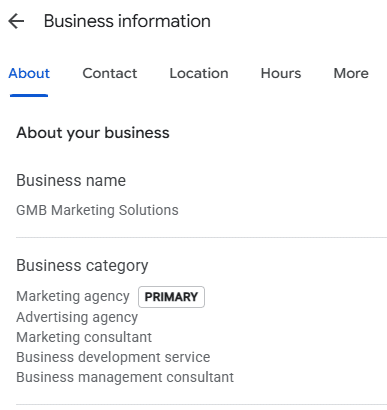
To pick it, search your main service in your area and open the top three profiles. Look at the category under each business name. You’re not copying anyone; you’re seeing how Google labels businesses like yours. Then set yours under Edit profile › Business category. (Here’s more on choosing your categories.)
2. Add every additional category that’s true, and none that aren’t
You get up to nine additional categories. Google’s guidelines say to use the fewest categories it takes to describe your core business. But Sterling Sky tested a landscaper whose profile had only one category. After adding landscape designer, landscape architect and retaining wall supplier, all services the business really offered, it ranked higher for those searches.
My rule: add every category that’s genuinely true for your business. If you don’t do it, it doesn’t go on. Be accurate. Be honest.
3. Fill out your services, and mirror them on your website
The services section is where you tell Google, “this is what I do.” Google suggests services based on your category; start with those, and use the plus button to add custom services it doesn’t list. Focus on the services that make you the most money and that you’re sharp at. Don’t list the same service five different ways, and keep the city out of service titles so customers in neighboring towns don’t think you skip them.
Then mirror it on your website. Every category and main service on your profile should have its own page on your site. If your profile says you do something and your website never mentions it, that’s a disconnect. Experts rate on-page signals as one of the biggest pieces of local ranking, and those pages are also what Google’s new AI answers can point to.
4. Get real reviews, steadily
The experts in the same survey ranked your star rating, the number of reviews with written text, and how recent they are among the top review signals. A steady flow beats a big burst once a year.
Google gives you a review link and QR code under Ask for reviews. Put it where you touch every customer: invoice emails, follow-up texts, a card at checkout. (How to set up your review link.)
And follow the rules, because they’ve gotten stricter:
- No discounts, gifts or payments for reviews.
- Ask every customer the same way. Only asking your happy ones (“review gating”) isn’t allowed.
- Don’t pressure people to review while they’re still at your business, and don’t tell them what to write.
- No review quotas for staff.

5. Keep your hours accurate
Experts rank “open at the time of search” as the fifth biggest factor. Keep your hours right, and set special hours for holidays.
What doesn’t move rankings (even though people sell it)
- Posting every day. Sterling Sky tested posts on profiles with no other SEO work and found no measurable ranking impact. Posts are still great for turning visitors into calls, so post for your customers, not for the algorithm. In my own testing, I posted 5 to 15 times a week on autopilot for several months. I saw short-term bumps for keywords a post mentioned once Google indexed the post, but they didn’t last. And looking at the profile as a customer would, that much posting didn’t look real. One to three good posts a week is plenty.
- Geo-tagged photos. The experts ranked this dead last: 187 out of 187. Post real, good photos of your work for customers instead.
- Keywords in your reviews. Sterling Sky tested it; rankings didn’t improve. And asking customers to include keywords now breaks Google’s review rules.
The rules that get profiles suspended
A suspended profile disappears from Maps until Google reinstates it. I know because it happened to one of mine.
- Your name must match your real-world business name. No added keywords or cities. Experts do rank keywords in the name as a top-three factor, which is exactly why people get suspended for it. It’s not worth the risk.
- Your address must be a real location. No P.O. boxes, and virtual offices aren’t eligible unless they’re staffed during business hours.
- If you go to your customers, you’re a service-area business: Google says to hide your address and set a service area.
- One profile per location. No duplicates.
- Make big changes one at a time. A new name, address or category can trigger a review. Space them out and keep your documents ready.
If it happens to you, here’s how to fix a suspended profile.
What changed in 2026
On March 12, 2026, Google launched Ask Maps in the U.S.: people can ask Google Maps a full question and its AI answers using profiles, reviews and photos. Sterling Sky also found that over the same set of searches, AI local results showed about 5,900 different businesses versus about 18,300 in regular 3-packs. Fewer businesses get shown, which can mean fewer calls even when your rankings look steady. Detailed, honest reviews and a complete profile matter more than ever.
How to measure your Google Maps ranking results
Open your Performance report. Two numbers people mix up: searches that showed your profile, and people who actually viewed it. Select last month plus this month, because Google can be slow to fill in the data. Then track what really matters: calls and real customers, not photo views.
Keep a simple change log: date, what you changed, why. Google is slow. You won’t change something Monday and see it Tuesday. When your numbers move a few weeks later, your notes tell you why.

Your 10-minute checklist
- Check your primary category against the top three in your area.
- Add every additional category that’s true for your business.
- Fill in your services; make sure each main one has a page on your website.
- Put your review link where every customer sees it.
- Confirm your name, address and hours follow Google’s rules.
- Write today’s date and these changes in a change log.
Quick answers
How long does it take to rank higher on Google Maps?
It depends on your competition and what needs fixing. Google re-evaluates changes over weeks, not days, so judge results over a month or more.
Do Google posts help me rank?
Testing says no direct ranking boost. They can still help people choose you.
Should I add my city to my business name?
No. It breaks Google’s guidelines and can get your profile suspended.
Want me to look at your profile? Get a free local SEO audit.
Lenny Rowell has spent 10+ years getting local businesses found on Google, both in Maps and in regular search results. He works with small, mid-size and large businesses, and unlike most agencies that only do general SEO, he ranks the Business Profile and the website together. He’ll tell you straight what will and won’t move the needle.
Sources
- Google: Guidelines for representing your business on Google
- Google: Tips to improve your local ranking on Google
- Google: How we’re reimagining Maps with Gemini (Ask Maps), March 12, 2026
- Google Maps: Fake engagement policy
- Whitespark: Local Search Ranking Factors 2026
- Sterling Sky: Do Google Posts impact ranking?
- Search Engine Roundtable: Keywords in reviews don’t impact local rankings (Sterling Sky study)
- Whitespark: Sterling Sky’s category test (Q3 2025 roundup)
- Sterling Sky: The State of Local SEO in 2026